
Where a new POS goes wrong
A POS station sits at the center of your checkout, so a bad fit costs you every day. These are the problems we see most, and how we handle a PAYS POS setup instead.
What you often find
- A POS chosen for its features, not for how the lane runs
- Hardware bundled with pricing nobody explained
- A cash drawer and card terminal that don’t work together
- Surcharge or cash price settings added as an afterthought
- A support line that routes you to a call center
At PayZoom
- We ask how your checkout runs before recommending a station
- Interchange-Plus pricing, with our margin on its own line
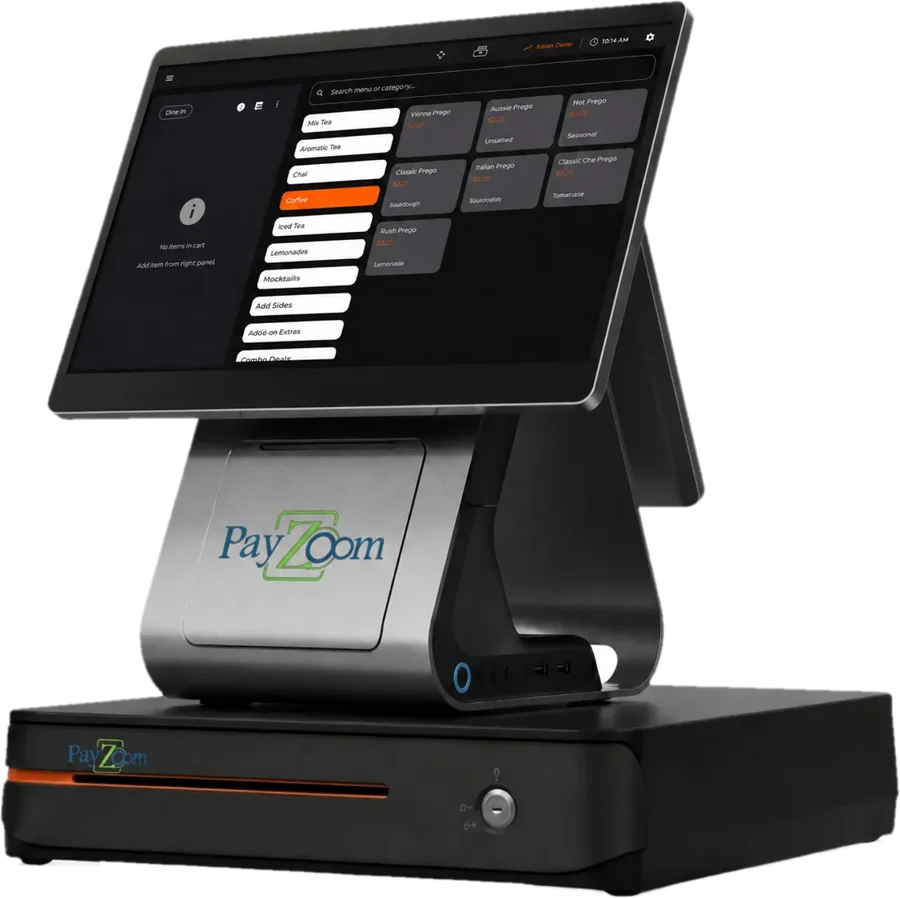
- One countertop station for cash and card sales
- Surcharging or cash discount planned in from the start, if you want it
- Support that is never outsourced. A real person answers
How a PAYS POS setup works with PayZoom
A full POS station is only as good as the account behind it. Three pieces make it work.
Right device
A dual-screen countertop POS with a cash drawer, for a lane where customers pay in one place.
Right pricing
Interchange-Plus, with our margin shown and never increased, in writing. As low as 0.05% + $0.22 per transaction, depending on your setup.
Real support
We set it up on your account and answer the phone after the sale. Support is never outsourced.
The PayZoom Statement Review
- Send. Email us one recent processing statement.
- Read. We line-item every fee and separate what the card networks charge from what your processor keeps.
- Recommend. You get a plain-English answer. If you are already paying a fair price, we will tell you.
- Switch. If you move to PayZoom, we set up processing to fit your POS, gateway or cart.
Having one tool and one log-in for all of our locations was extremely helpful.
Joe Malouf, Full Moon Bar-B-Que
Since 2006, a person who knows your account.
| Founded | 2006, Daphne, Alabama |
| Clients in | Nearly every U.S. state |
| Support | Never outsourced |
| Registered partner of | Cygnus Payments and Evolv Payment Solutions |
Questions merchants ask us
Straight answers. If yours is not here, call us and a real person will answer it.
Who is PAYS POS a good fit for?
Businesses with a fixed checkout lane that take cash and cards, such as retail stores, grocery lanes and counter-service restaurants. If your customers always pay in one spot and you want the register and payments together, it is worth a look. If you sell on the move, a mobile terminal fits better.
Do I need PAYS POS to process with PayZoom?
No. PayZoom is platform-agnostic. We set up processing to fit the POS, gateway or cart you already use, and we don’t sell proprietary POS. PAYS POS is one option when you need a full station, not a requirement. If your current POS works, we’ll keep it and tell you so.
Can I surcharge or run a cash discount on PAYS POS?
Tell us which program you want before setup. We configure the program to card-brand rules, including a surcharge cap of 3% and no surcharge on debit or prepaid cards. Some states restrict surcharging, so check current rules where you do business. A cash discount program follows its own rules, and we’ll walk you through both.
What does processing cost on PAYS POS?
The station doesn’t set your rate. We recommend Interchange-Plus: card-network costs at cost, plus our margin on its own line, as low as 0.05% + $0.22 per transaction, depending on your setup. Send a statement and we’ll show you the math.
Who supports the station after it is installed?
We do. Call 866.242.4325 or 251.626.8100 and a real person answers. PayZoom support is never outsourced, and we don’t charge early termination fees if you ever decide to leave. We set up your station, so the person you call already knows your setup.



Send us one statement. We’ll tell you exactly what you’re paying.
No cost and no pressure. If your current rate is fair, we’ll say so. We typically reply the same business day.
| Call toll-free | 866.242.4325 |
| Local | 251.626.8100 |
| nate@bizpayzoom.com |